
How to read sales by placement
Dropr's Performance page shows the sales, views and adds to cart from each placement for the last 7, 30 or 90 days. The numbers count what shoppers did after seeing your recommendations.
Updated
Open sales by placement
- In Dropr, open Performance.
- Pick 7, 30 or 90 days. The page opens on 30 days.
- Find Sales by placement. Each row is one place on your store where Dropr shows, highest sales first.
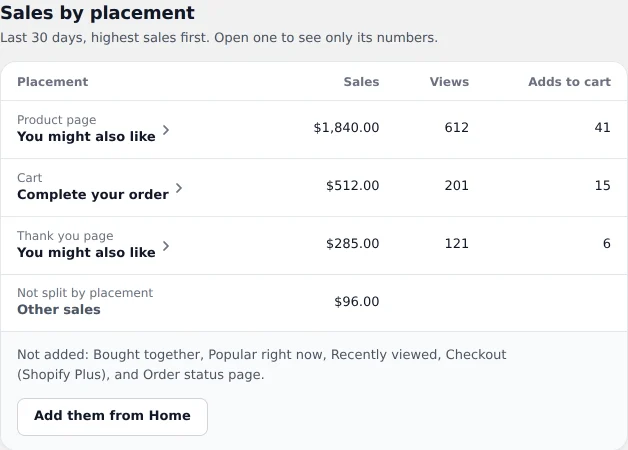
Example dataExample data, not results from a real store. - Optional: Click a placement to see only its numbers. To go back, pick All placements in Placement.
What each number means
| Column | What it counts |
|---|---|
| Sales | The price of each product a shopper added from that placement, in orders that were paid. Other products in the same order aren't counted. Discounts and refunds aren't taken out. |
| Views | Each time a set of recommendations loads on a page, Dropr counts one view. Previews in the theme editor don't count. |
| Adds to cart | Times a shopper added a recommended product to the cart. |
The Sales from recommendations total adds up the Sales column, other sales included, and says how many paid orders it came from. Add-to-cart rate is adds to cart divided by views. When you pick one placement, these show that placement only.
How Dropr knows which placement sold
When a shopper adds a product from a recommendation, Dropr tags that line in the cart with the placement it came from. When the order is paid, Dropr reads the tag. A product the shopper added some other way isn't counted, even if Dropr recommended it too.
Dropr counts an order when it's paid. Refunds and cancellations later don't change the numbers.
The numbers say what happened after shoppers saw your recommendations. They don't say a shopper wouldn't have bought the product anyway.
Other sales
A row called Other sales, marked Not split by placement, holds sales from products added before Dropr tagged each placement. They count in your total but can't be split by placement.
If there are no numbers yet
- No shopper has seen Dropr yet means Dropr isn't live on your store. Click Turn on Dropr, or see how to turn on Dropr.
- No views in the last 7, 30 or 90 days means no recommendations loaded in that time. No shopper opened those pages, Dropr had nothing to show there, or Dropr was removed in Shopify's editor. See Dropr isn't showing on my store.
- Not added: lists placements that aren't on your store. Click Add them from Home to add one, or see how to add each recommendation.